

AI Agents are increasingly becoming useful tools for automating workflows, analyzing data, and handling a wide range of workplace tasks. However, to get real value from them, users need to understand how to use an AI Agent, from defining goals and preparing data to setting up workflows and controlling outputs. In this article, Ohtez provides a step-by-step guide to deploying AI Agents, along with practical use cases, safety principles, and optimization methods to help the system operate more reliably.
What is an AI Agent and how does it work?
An AI Agent is an artificial intelligence system that can receive a goal, analyze context, choose actions, and use tools to complete a task. Unlike models that only respond to one question at a time, an Agent can maintain state and continue working through multiple steps. Understanding how to use an AI Agent helps users define the right scope of application before deployment.

How to use an AI Agent? An AI Agent can receive a goal, analyze it, and autonomously carry out multiple consecutive steps
>> See also: What does AI Agent mean? How it works and detailed applications in 2026
Core components of an AI Agent
An AI Agent is usually built from several coordinated components rather than relying on a language model alone. When learning how to create an AI Agent, businesses should clearly define the role of each component to avoid building a system that is more complex than the actual need. This is also an important foundation for understanding how to use an AI Agent correctly.
In practice, anyone learning how to use an AI Agent should start with a minimal structure. Add memory, APIs, or multiple tools only when the task genuinely requires them.

Effective use of an AI Agent should start with a minimal structure, adding tools only when they are truly needed
How an AI Agent processes a task
An Agent typically starts by receiving a goal from the user, then analyzes the information and determines which actions are required. Next, the system selects the appropriate tool, processes the data, evaluates the result, and decides whether to finish or continue to another step. Understanding this cycle makes the process of learning how to use an AI Agent more systematic instead of relying entirely on the initial prompt.
A common workflow can be visualized as: goal → analysis → planning → action → evaluation → feedback. This principle is also widely used when learning how to create an AI Agent for multi-step tasks. For anyone learning how to use an AI Agent, clear stopping conditions, retry limits, and evaluation criteria are essential to prevent the Agent from repeating actions or producing unnecessary outputs.

A systematic approach to using an AI Agent requires clear stopping conditions, retry limits, and evaluation criteria
How to use an AI Agent for beginners
Beginners should start with a simple task that has clear inputs, outputs, and evaluation criteria. The most effective way to learn how to use an AI Agent is to test it on a small scale first, then expand the data, tools, and level of automation only after the system operates reliably.
1. Define the goal and task to automate
First, identify the specific job the Agent needs to handle. When deciding how to use an AI Agent, prioritize repetitive tasks with a clear process and results that are easy to verify. For example, instead of asking the Agent to “analyze customers,” you can ask it to group customer feedback into the main issue categories. When learning how to create an AI Agent, users should also define the input data, expected output, and cases that need to be escalated to a human in advance.
2. Prepare data and tools for the AI Agent
Input data should be accurate, up to date, and relevant to the task. When determining how to use an AI Agent, provide only the data sources and tools that are genuinely necessary to reduce errors and bias. Users learning how to create an AI Agent on ChatGPT can add reference documents, instructions, and appropriate connections. If the Agent only needs to summarize documents, grant read access rather than permission to edit or delete data.

Input data should be accurate and up to date, with the Agent granted only the level of access that is truly necessary
3. Set up the workflow and access permissions
Next, clearly define which steps the Agent is allowed to perform and which actions require approval. To understand how to use an AI Agent safely, follow the principle of least privilege, meaning the Agent can access only the data it needs. When learning how to create an AI Agent, users should add confirmation steps for important actions such as sending emails, changing data, or incurring costs. This helps reduce risk when the Agent makes an incorrect decision.
4. Test the results before deployment
Before going live, the Agent should be tested across different scenarios. To learn how to use an AI Agent effectively, check its accuracy, ability to handle missing data, and responses to out-of-scope requests. When learning how to create an AI Agent on ChatGPT, you can use a fixed set of test questions to compare results after each adjustment. Expand the scope of use only when the Agent produces stable, controllable results.
How to use an AI Agent at work
AI Agents can support many types of work, from operations and data analysis to customer service. To understand how to use an AI Agent effectively, choose the right task, deploy it on a small scale, and measure the results before expanding. Common applications include:
- Automating repetitive tasks: An AI Agent can classify emails, consolidate data, create recurring reports, or update information across multiple systems.
- Analyzing data and creating reports: An Agent can collect and standardize data, identify trends, and summarize KPIs, helping users save time on manual processing.
- Supporting research and content development: An AI Agent can search for and categorize documents, summarize key points, and create drafts for the person in charge to review and edit further.
- Customer service: An Agent can classify requests, look up FAQs, suggest responses, and route complex cases to the appropriate staff member for handling.
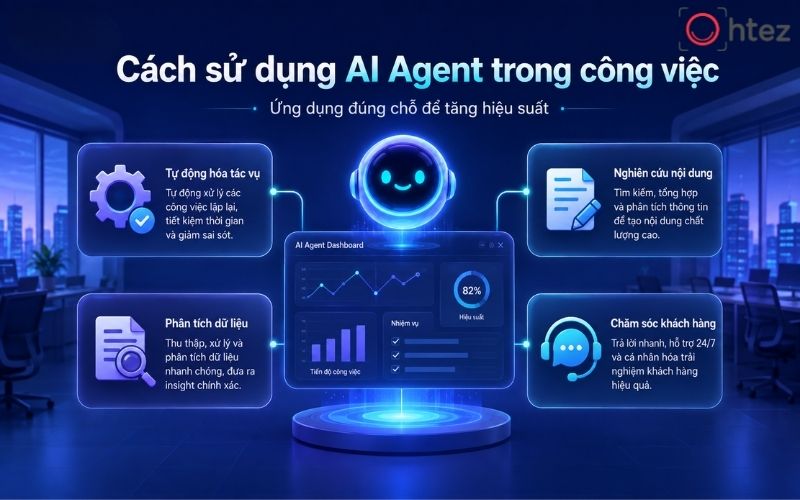
Using an AI Agent at work can include automating repetitive tasks, analyzing data, and supporting customer service
When learning what an AI Agent is or how to create an AI Agent, businesses should prioritize tasks with clear processes, high repetition frequency, and results that are easy to evaluate. This way of learning how to use an AI Agent reduces manual work while ensuring that people remain in control of important decisions.
>> See also: How to create an AI Agent for technical-standard automation [Complete 2026]
How to use an AI Agent safely and effectively
AI Agents can access data, call tools, and perform multiple processing steps on their own, so they need to be tightly controlled. Knowing how to use an AI Agent safely means focusing not only on performance but also on limiting risk throughout operation. Important principles include:
- Limit data access permissions: Give the Agent only the data and functions it needs, and prioritize read access over permission to edit, download, or delete information.
- Control hallucinations: Require the Agent to rely on defined sources, avoid guessing when data is missing, and state clearly when there is not enough evidence to answer.
- Monitor tokens and API costs: Control the number of model calls, processing steps, and resource consumption to avoid unnecessary costs.
- Keep a human review step: Tasks involving finance, legal matters, customer data, or important decisions should require human confirmation before execution.

Safe use of an AI Agent requires limited access permissions, hallucination controls, and ongoing human review
When learning what an AI Agent is or how to create an AI Agent, businesses should design control mechanisms from the beginning instead of adding them only after an error occurs. Learning how to use an AI Agent this way helps the system operate reliably, remain easy to monitor, and reduce risks that could affect data or business operations.
Principles for optimizing AI Agents in practice
A practical understanding of how to use an AI Agent requires businesses to focus on objectives, measurability, and stability instead of continuously adding features. Key principles to prioritize include:
- Use an Agent only when it is truly necessary: Prioritize multi-step tasks that require decisions or tool use; simple tasks may be better handled with a conventional workflow.
- Design around a specific goal: When learning how to create an AI Agent, define the desired outcome first, then choose the data, APIs, and features that need to be integrated.
- Measure with clear metrics: Track accuracy, completion rate, processing time, and cost to determine whether the Agent is actually creating value.
- Optimize based on operational data: Record errors, feedback, and failure cases to adjust instructions, data sources, or workflows instead of changing prompts based on intuition.
In practice, understanding what an AI Agent is matters less than how effectively the system gets the job done. If you are wondering how to use an AI Agent, the answer is simple: start small, measure results regularly, and expand only after the Agent is operating reliably.
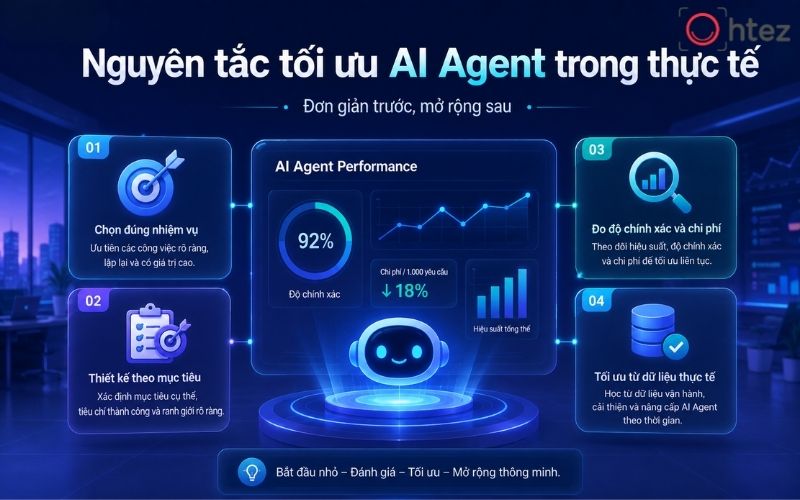
The best way to use an AI Agent is to start simple, measure results regularly, and expand once the system is stable
Understanding how to use an AI Agent correctly helps individuals and businesses benefit from automation while maintaining control. Instead of building a complex system from the start, begin with a clearly defined task, suitable data, and specific evaluation criteria. During operation, regularly monitor accuracy, cost, access permissions, and any unexpected scenarios. Once the AI Agent is stable, users can gradually expand its scope to improve efficiency and optimize workflows.