
Video production often requires significant time and effort for research, scriptwriting, sourcing visuals, voiceovers, and editing. An AI Video Generation Agent helps connect these stages into an automated workflow, reducing the need to switch between different software tools. However, the level of automation depends on each platform’s features and access permissions. This article explains how these systems work, how to choose the right tools, and how to build your own video production workflow.
What is an AI Video Generation Agent?
An AI Video Generation Agent is a system that uses AI models and connected tools to perform multiple stages of video production. When given a request, the Agent can analyze objectives, develop a plan, generate assets, and coordinate video editing tasks. However, this capability does not mean that AI can think independently like a human. The system still operates within the limits of its available features, data, and granted permissions.
Unlike a conventional AI video generator that produces individual clips, an AI Video Generation Agent focuses on managing the entire production workflow. For example, based on a service introduction brief, the Agent can develop a script, organize scenes, and add voiceovers. Some platforms can generate a complete video draft, but users still need to review the information, visuals, and messaging before publishing.
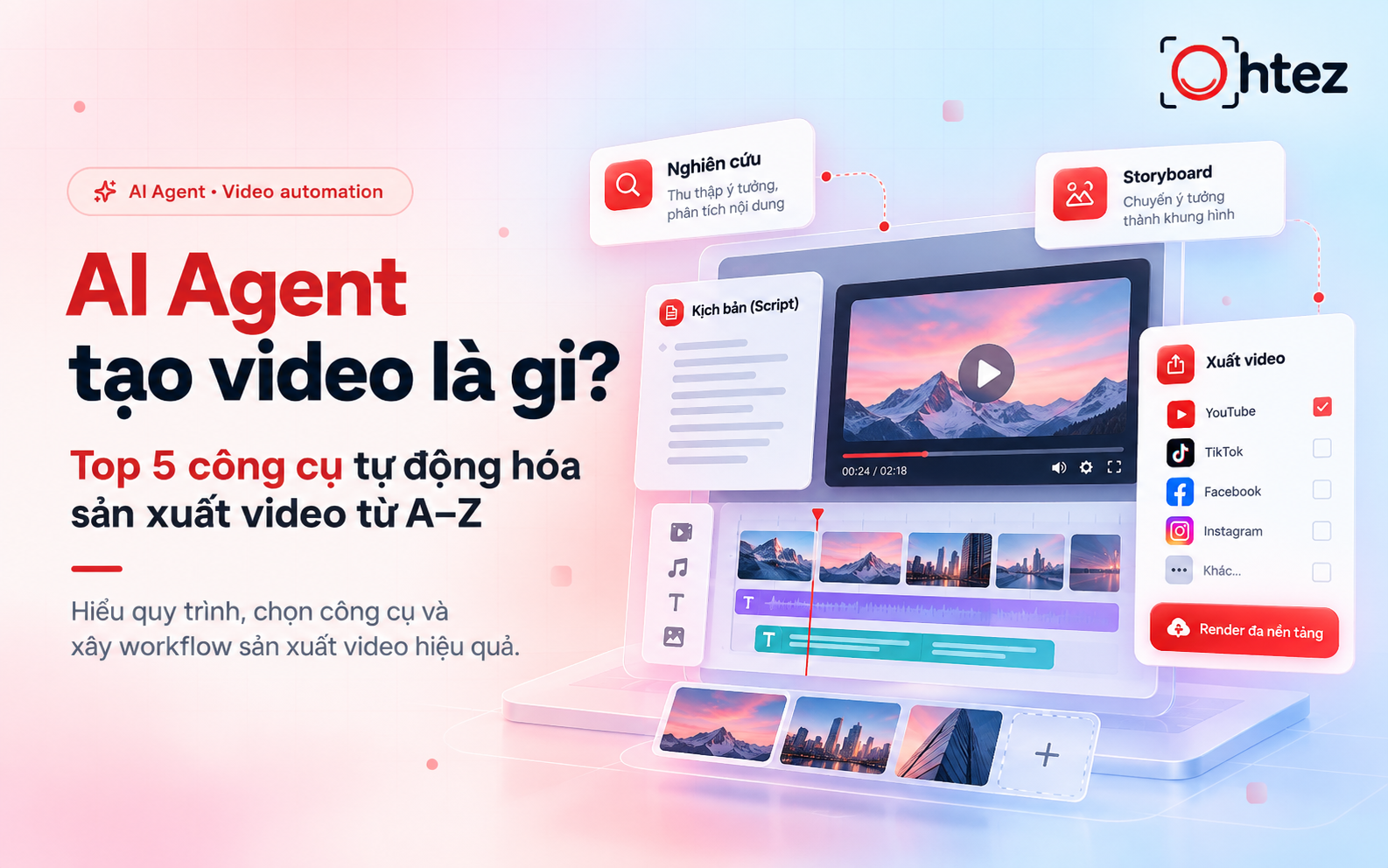
What is an AI Video Generation Agent?
How does an AI Video Generation Agent automate the video production process?
An AI Video Generation Agent can connect different stages of video production, from research to final video export, through the following five steps. The level of automation depends on the platform’s capabilities and the tools integrated into the workflow.
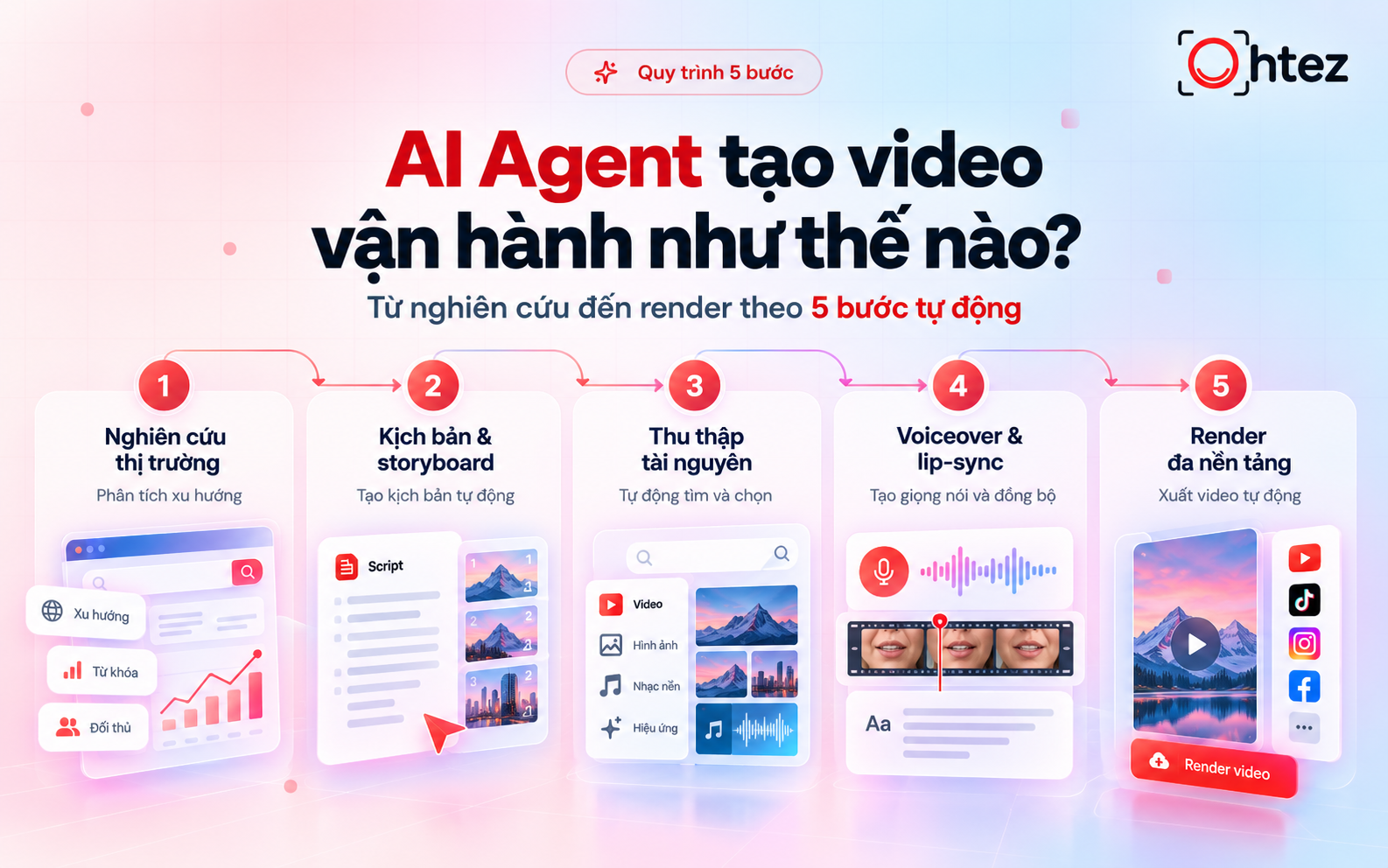
How does an AI Video Generation Agent automate the video production process?
Step 1: Market research and idea generation (Wide Research)
When equipped with web research capabilities, the Agent gathers information about relevant topics, audience interests, and trending content. Based on these insights, the system suggests video ideas that align with the target audience and production objectives. Users should verify the sources before incorporating any statistics or factual information.
Step 2: Automated scriptwriting and storyboarding
An AI Video Generation Agent creates a script that includes an introduction, main content, and a call to action (CTA). The system then divides the script into individual scenes, defining the dialogue, supporting visuals, and duration of each segment. The storyboard allows users to review the storytelling structure before video production begins.
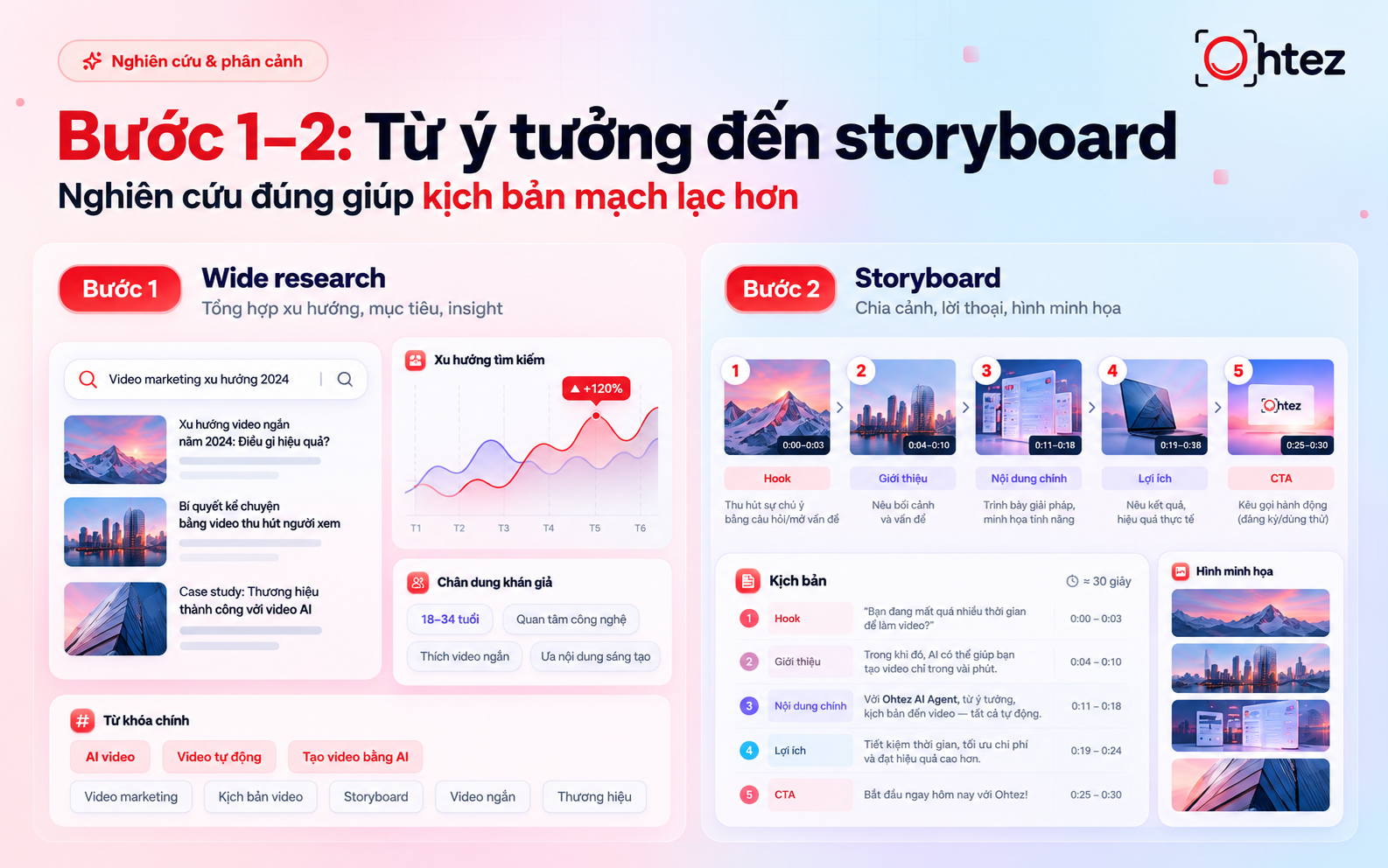
Steps 1–2: From Idea to Storyboard
Step 3: Asset collection and generation (Images, AI clips, background music, and subtitles)
The Agent generates or selects images, video clips, and background music for each scene while also preparing subtitles. Users should provide brand logos, brand colors, and authentic product images to maintain visual consistency. All assets must have appropriate usage rights before being incorporated into the video.
Step 4: Expressive AI voiceovers and lip-sync synchronization
The system converts the script into AI-generated speech, adjusting the speaking speed, tone, and emotional expression to match the content. When a virtual presenter is used, lip-sync technology can synchronize mouth movements with the spoken dialogue. Users should preview the audio to identify and correct pronunciation errors involving brand names and technical terminology.
Step 5: Rendering and format optimization (TikTok, Reels, YouTube Shorts)
An AI Video Generation Agent combines visuals, audio, and subtitles into a complete video, then exports it in formats suitable for different platforms. For vertical videos, users should check the framing and text placement to ensure important elements are not obscured. The final version should be reviewed before publishing, while automatic posting requires additional integrations.
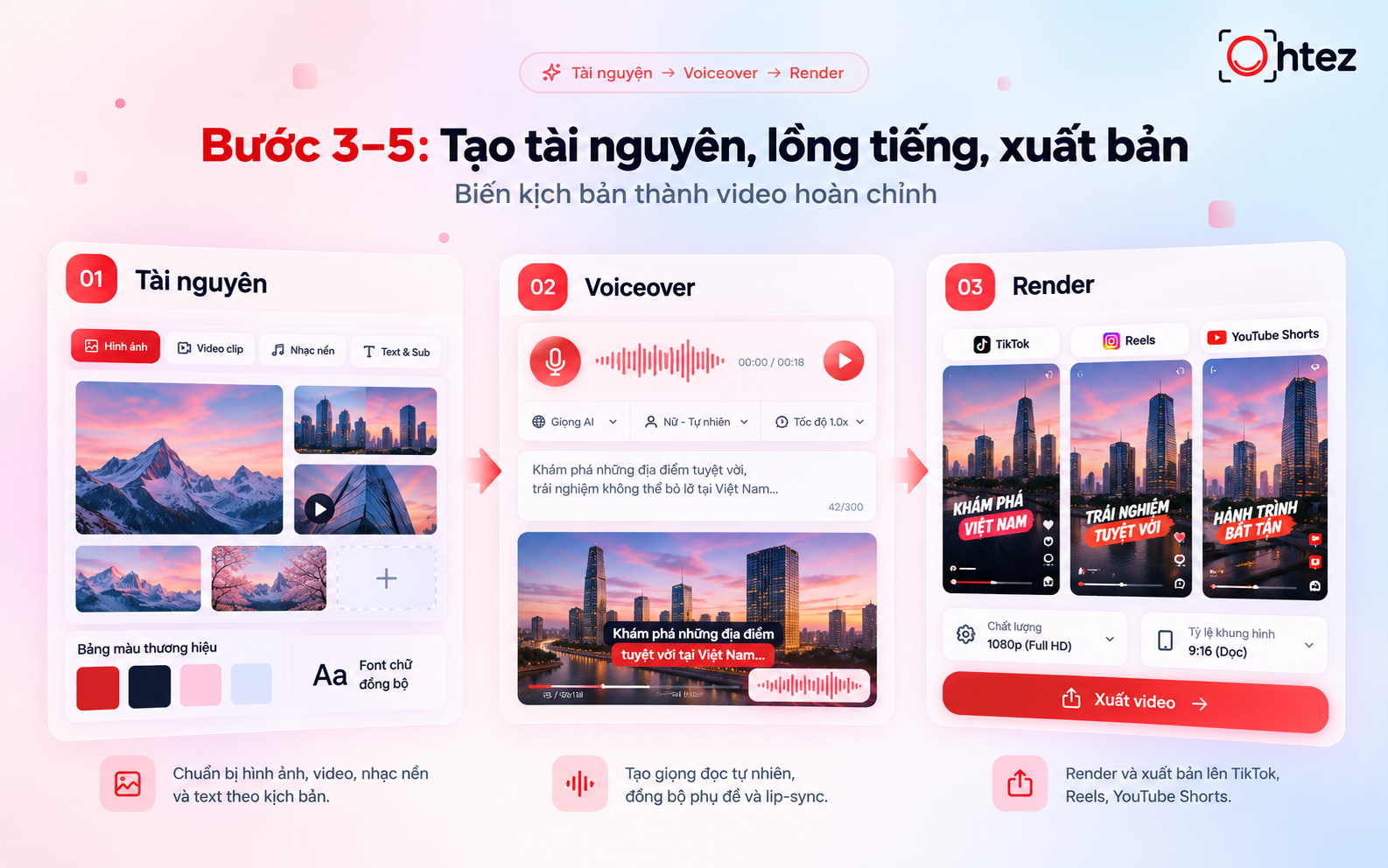
Steps 3–5: Asset Creation, Voiceover, and Publishing
Top 5 AI Video Generation Agent tools available today
Each AI Video Generation Agent serves different needs, from virtual presenter videos to short films and product advertisements. Below is an overview of five tools, including their key features, advantages, and limitations, to help you choose the most suitable solution.
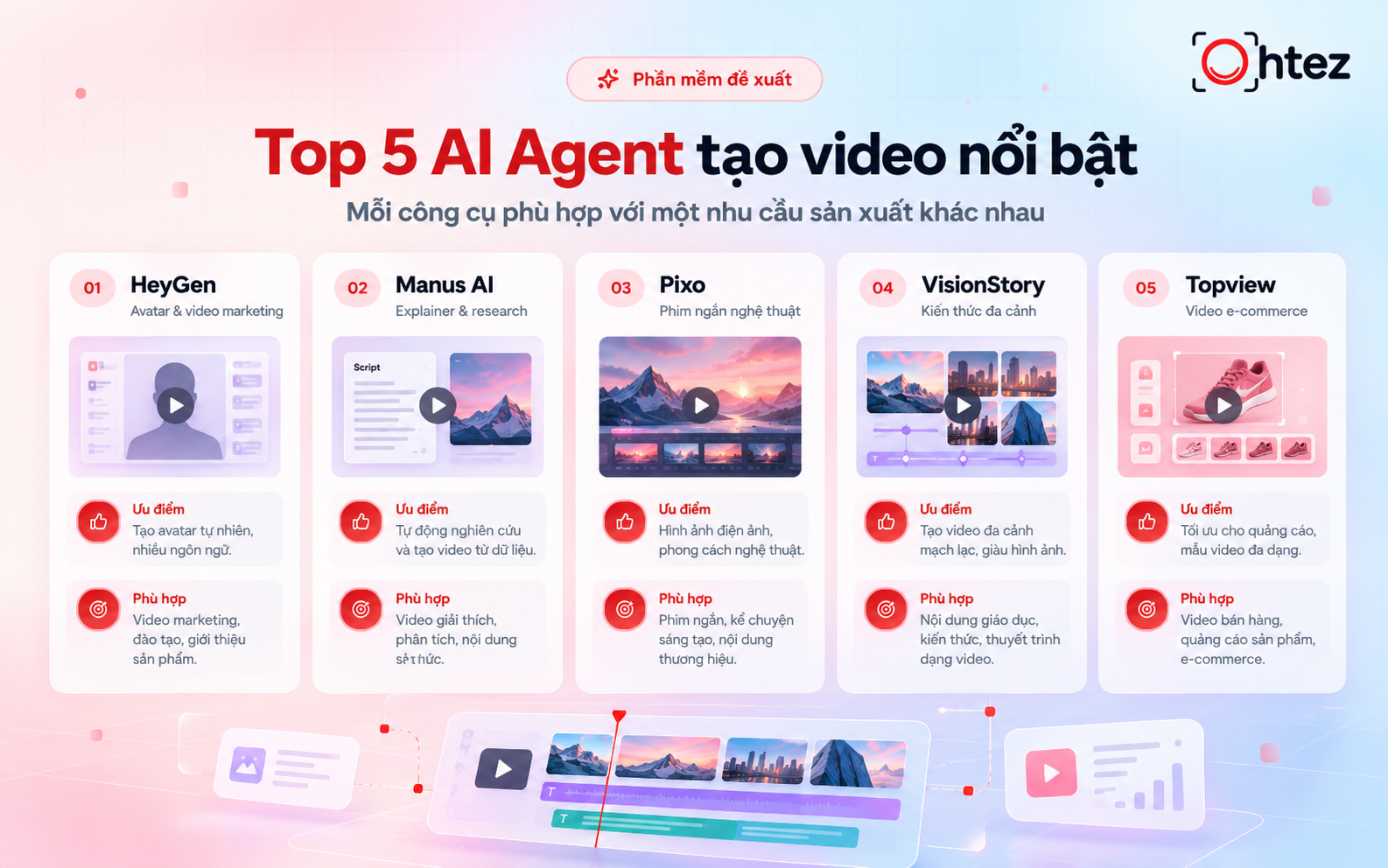
Top 5 AI Video Generation Agent tools available today
1. HeyGen Video Agent – Advanced AI avatars for video marketing and sales
HeyGen Video Agent enables users to create videos featuring virtual presenters based on prompts or scripts. This tool is particularly suitable for service introductions, tutorials, and marketing videos that require an on-screen presenter.
- Advantages: Creates AI avatar videos without requiring live filming, making it easier to produce promotional and instructional content.
- Disadvantages: Voice naturalness and lip-sync accuracy require careful review. Multiple revisions may also increase credit consumption.
Reference pricing: The Creator plan costs $29/month or approximately $24/month when billed annually.
HeyGen Video Agent – Advanced AI avatars for video marketing and sales
2. Manus AI Video Maker – In-depth research for explainer video production
Manus AI Video Maker combines Wide Research capabilities with scriptwriting, storyboarding, and visual content generation. This AI Video Generation Agent is particularly suitable for product explainer videos and content that requires extensive information gathering.
- Advantages: Integrates research, scriptwriting, and storyboarding into a single workflow, helping users create well-structured video content.
- Disadvantages: Information collected from the web still requires verification. Script quality also depends on the reliability of data sources and the clarity of input instructions.
Reference pricing: The Pro plan starts at $20/month, with actual usage costs depending on tasks and credit consumption.
Manus AI Video Maker – In-depth research for explainer video production
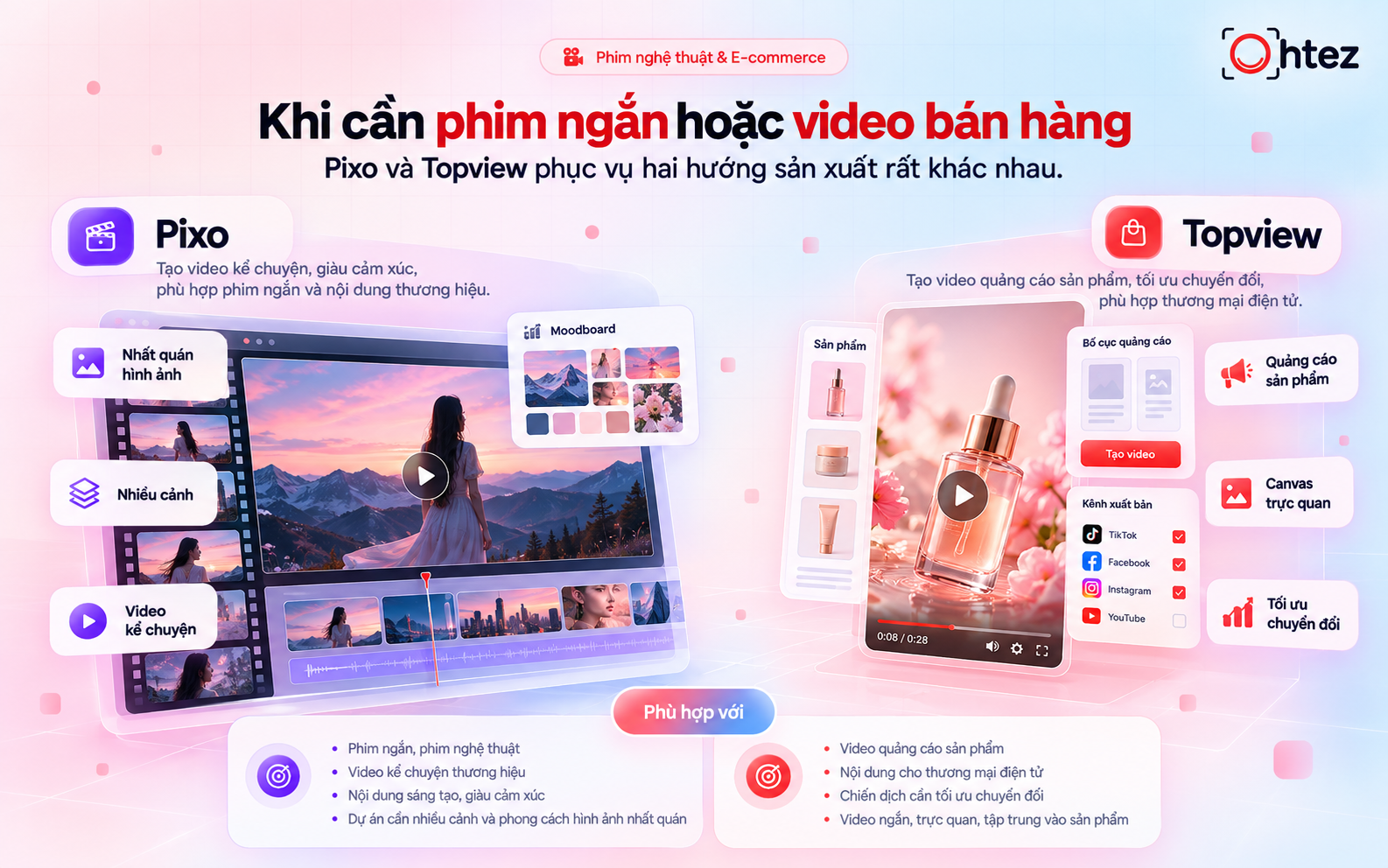
3. Pixo AI Video Agent – Integrating advanced AI models (Veo, Kling) for cinematic video creation
Pixo accepts briefs or scripts to create storyboards, generate individual scenes, and assemble complete videos. The platform focuses on short films, storytelling videos, and content that requires visual consistency across multiple scenes.
- Advantages: Manages multiple scenes within a single project, helping maintain character consistency and visual style throughout the production process.
- Disadvantages: Complex motion sequences may require additional testing. Users should also verify available AI models and credit requirements before producing an entire video.
Reference pricing: The Basic plan costs $19.90/month or approximately $9.90/month when billed annually, including 1,000 credits.
Pixo AI Video Agent – Integrating advanced AI models (Veo, Kling) for cinematic video creation
4. VisionStory AI Agent – Multi-scene video creation for educational and news content
VisionStory transforms prompts, URLs, or documents into videos featuring AI avatars, voiceovers, supporting visuals, and subtitles. Users can make adjustments through conversational instructions before rendering, making the platform suitable for training materials and educational content.
- Advantages: Combines scriptwriting, virtual presenters, narration, and subtitles into a single workflow. It also supports scene-by-scene editing through conversational interactions.
- Disadvantages: AI avatar presentation styles may not suit every type of content. Vietnamese pronunciation and information sources should be carefully reviewed before publishing.
Reference pricing: The Pro plan costs $9.99/month and includes 120 credits. Video duration limits and available features vary by subscription plan.
VisionStory AI Agent – Multi-scene video creation for educational and news content
5. Topview AI Canvas – An automated video production studio for e-commerce
Topview AI Canvas provides a visual workspace for brainstorming ideas, generating assets, organizing storyboards, and producing videos. This AI Video Generation Agent is particularly suitable for product advertisements and e-commerce video content.
- Advantages: Allows users to view and edit multiple scenes within a single workspace, making it easier to review layouts and maintain visual consistency before producing the final video.
- Disadvantages: AI-generated visuals may contain inaccuracies in product details. Users should compare generated content with authentic product images and account for additional credits when making revisions.
Reference pricing: The Business plan costs approximately $44/month when billed annually, totaling $528/year.
Topview AI Canvas – An automated video production studio for e-commerce
How to build your own AI Video Generation Agent (No coding required)
You can connect existing tools to build an AI Video Generation Agent using Make or n8n. However, if you need more advanced customization, the open-source approach discussed below will require programming skills
How to connect workflows using no-code automation (Make, n8n)
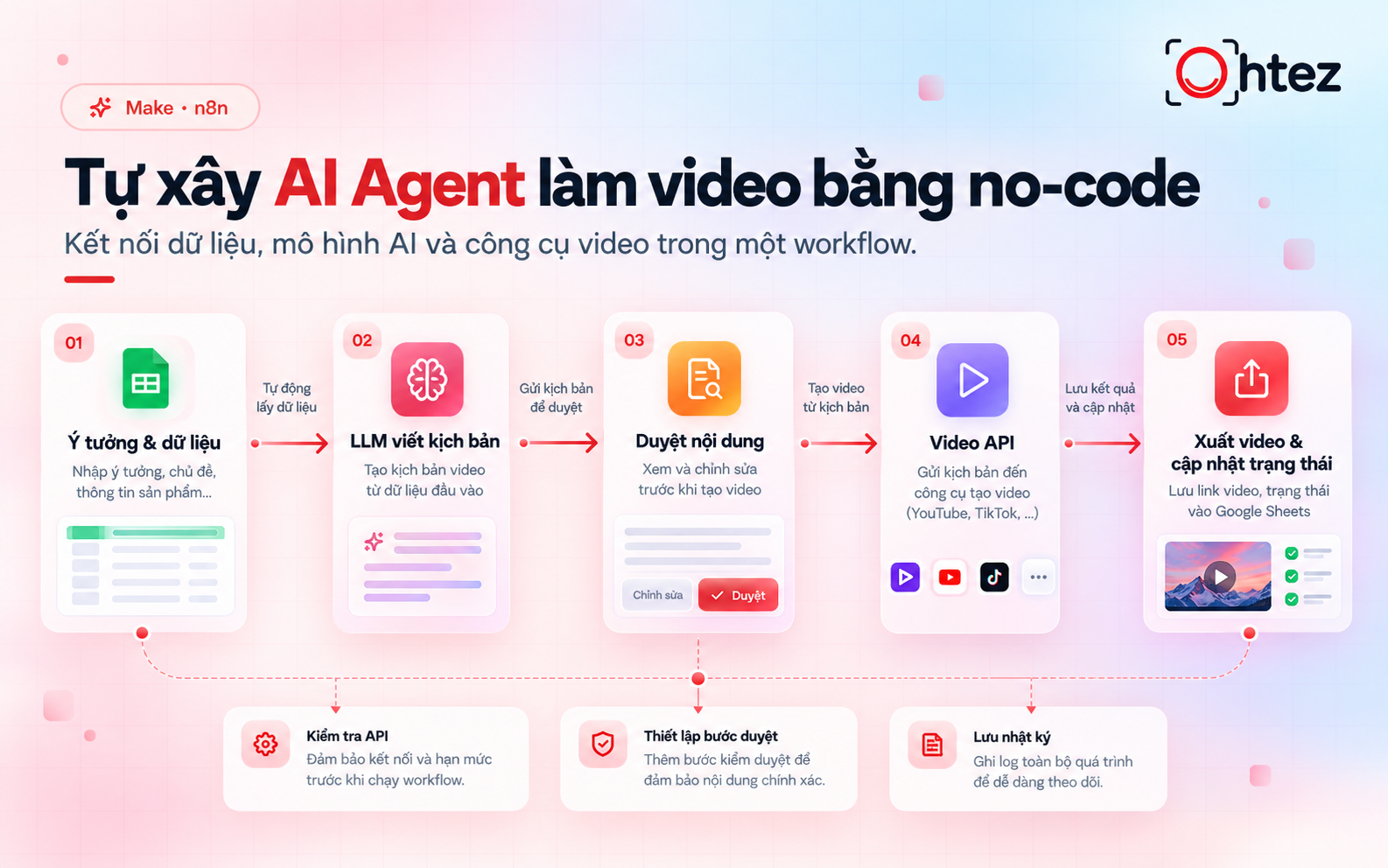
Make and n8n allow users to connect data sources, AI models, and video creation tools through a visual workflow. You can implement the process through the following steps:
- Idea collection: Retrieve video topics, target audience details, product information, and video duration from rows in Google Sheets.
- Scriptwriting: Send the collected data to a language model to generate dialogue, divide the content into scenes, and suggest suitable visuals for each segment.
- Video generation: Submit the approved script to a video creation tool with a compatible API, then retrieve the generated video file and update its processing status.
- Review and publishing: Review the final video before moving it to the publishing stage, provided the platform supports the required integrations and the connected account has sufficient permissions.
Before running an AI Video Generation Agent, users should verify API access permissions and establish a content approval process. n8n supports human approval mechanisms that require authorization before an AI Agent executes designated tools.
How to build your own AI Video Generation Agent (No coding required)
>> Read more: AI Agent implementation costs for businesses in 2026
Open-source frameworks for developers (HyperFrames, CLI Agents)
Open-source solutions are suitable for developers who need greater control over video layouts, processing rules, and rendering methods. When building an AI Video Generation Agent, two components worth considering include:
- HyperFrames: Converts HTML, CSS, and multimedia assets into MP4 videos, handling video assembly and rendering within the production workflow.
- CLI Agents: A general term for AI Agents that operate through command-line interfaces. These Agents can coordinate asset generation, validate files, and execute rendering commands.
To complete the system, developers must integrate additional components, such as scriptwriting models, image generation tools, and AI voiceover solutions. This approach offers greater customization flexibility but requires ongoing code maintenance and access permission management.
Benefits and challenges of using AI Agents in video production
An AI Video Generation Agent can accelerate video production workflows, but human review remains essential to maintaining content quality. Below are the key benefits and limitations businesses should consider.
Key benefits
- Time savings: Automates scriptwriting, storyboarding, and initial video editing, helping production teams reduce repetitive manual tasks.
- Scalable video production: Supports the creation of multiple videos using predefined templates, making it suitable for product introduction series, tutorials, and regularly scheduled content.
- Multiple content variations: Allows teams to experiment with different hooks, dialogue, and messaging to identify the most effective approaches for different audience segments.
- Greater focus on creativity: Reduces repetitive workloads, allowing teams to dedicate more time to developing ideas, refining messages, and strengthening brand storytelling.
The actual time and cost savings achieved with an AI Video Generation Agent depend on the type of content and the number of revisions required. Businesses should measure real-world performance rather than assuming that automation can automatically reduce production time and costs by 90%.
Current limitations
- Inaccurate information or visuals: AI-generated scripts may contain unsupported claims, visuals may misrepresent product details, and voiceovers may mispronounce technical terms.
- Inconsistency between scenes: Characters, backgrounds, and visual styles may change between scenes, resulting in videos that lack visual continuity.
- Usage rights and licensing concerns: Music, images, and voices must be reviewed for licensing restrictions and usage permissions before being included in commercial videos.
- Limited emotional expression: Content that requires authentic experiences, unique perspectives, or nuanced performances still benefits from human creativity and refinement.
- Additional regeneration costs: Revising scenes, changing voiceovers, or rendering videos again may increase credit consumption and overall production expenses.
To use an AI Video Generation Agent effectively, businesses should review scripts, sample scenes, and final video versions before publishing.
Benefits and challenges of using AI Agents in video production
>> Read more: How to create an AI Agent on ChatGPT: A step-by-step guide
An AI Video Generation Agent offers a more flexible approach to content production, connecting research and scriptwriting with asset generation, voiceovers, and video editing. To implement this technology effectively, businesses should select tools based on their video requirements, account for all potential costs, and maintain a reliable content review process. Start with a short video that has a clearly defined objective, then evaluate its performance before scaling up the workflow. Follow Ohtez to explore more insights about AI Agents and their applications in business operations.