


How to create an AI Agent on Claude goes beyond writing a prompt and asking AI to complete a task. For an Agent to proactively handle tasks, use data and tools, and work with real-world workflows, you need to build it properly from the goal, instructions, and context through to execution permissions and validation mechanisms. This article walks you through how to create an AI Agent on Claude Code step by step, while also explaining how to operate and optimize the Agent for more stable performance.
What is a Claude Agent and how does it work?
A Claude Agent can be understood as an AI system that uses Claude models to receive goals, analyze tasks, choose actions, and use tools to complete work with a certain degree of autonomy. Instead of simply answering one question at a time like a traditional chatbot, an Agent can read data, work with files, run commands, and continue processing based on the results it receives.
>> See also: What is an AI Agent? How it works and key applications in 2026
Core components of a Claude Agent
To implement how to create an AI Agent on Claude effectively, you first need to understand the components that make up an Agent. In practice, a Claude Agent does not rely on the AI model alone; it also needs instructions, context, and a tool system so it can carry out tasks proactively. The core components include:
- Instructions: Define what the Agent should do and how it should do it, including its role, tasks, scope of operation, limits, and output standards. The clearer the instructions are, the easier it is for the Agent to understand the goal and choose the right actions.
- Context: Provide the information the Agent needs to handle a task, such as project data, reference documents, folder structure, or information that should be retained during the workflow.
- Tools: Allow the Claude Agent to move beyond simply generating answers and take real actions such as reading and editing files, searching for information, or running commands.
- MCP (Model Context Protocol): Extends the capabilities of a Claude Agent by connecting it to external services, tools, and data sources.
- Result validation: Helps the Agent evaluate its output, detect issues, and continue making adjustments when needed. This is important for handling multi-step tasks reliably.
You can think of an Agent’s structure as a sequence: goal → data → rules → tools → result validation. These are the elements that should be prepared before you begin how to create an AI Agent on Claude Code.

How to create an AI Agent on Claude effectively starts with understanding core components such as instructions, context, and tools
Finally, the Agent needs a result-validation mechanism. Instead of taking one action and stopping, it can evaluate the output, identify problems, and continue adjusting when necessary. You can think of an Agent’s structure as: goal → data → rules → tools → result validation. These are the elements that should be prepared before you begin how to create an AI Agent on Claude Code.
Planning, action, and validation mechanism
A Claude Agent typically works in a loop rather than handling a task in a single pass. First, the Agent reads the request and context to determine the goal. It then analyzes what needs to be done, uses the appropriate tools, and observes the result before deciding on the next action.
For example, when asked to inspect a website, a Claude Agent can read the source code, identify the relevant files, make edits, run tests, and continue fixing issues if errors are found. This approach makes how to create an AI Agent on Claude more suitable for multi-step tasks than a conventional chatbot.
However, an Agent should not be given unlimited authority. Important actions such as changing data, running sensitive commands, or affecting a live system should be governed by clear approval rules.

A Claude Agent works in a loop of reading the request, analyzing the task, using tools, and observing the results
Before creating an AI Agent on Claude
Before following how to create an AI Agent on Claude, a business or individual should clearly define what the Agent will do and how far its permissions should extend. Careful preparation reduces the risk of the Agent pursuing the wrong objective, using unsuitable data, or performing actions outside the intended scope.
- Define the Agent’s tasks and goals: Clearly describe the inputs, work to be performed, expected results, and situations that should be handed off to a human.
- Choose Claude Code, the API, or Claude Desktop: Claude Code is suitable for project- and file-based tasks; the API is better for system integrations; Desktop is convenient for visual workflows.
- Prepare the required data and access permissions: Provide only the documents, folders, APIs, or tools that are genuinely needed for the task, rather than granting broader access than necessary.

How to create an AI Agent on Claude requires clearly defined tasks, the right platform, and appropriate data access permissions before deployment
>> See also: How to build an AI Agent for automation: Technical guide [Complete 2026]
How to create an AI Agent on Claude Code step by step
To understand how to create an AI Agent on Claude Code in a structured way, you should implement it step by step rather than configuring everything at once. The process below helps you build the Agent in a clear sequence, from setting up the environment to completing the configuration and improving operational performance. Follow each step in order so the Agent can work reliably and stay aligned with its intended goal.
Step 1: Install Claude Code
The first step in how to create an AI Agent on Claude is installing Claude Code on your computer. According to Anthropic’s current documentation, the native installer is the recommended option; users can also use Homebrew or WinGet depending on the operating system.
After installation, open the terminal and run:
claude
The system will guide you through signing in with a Claude account or another supported authentication method. Claude Code currently supports several authentication options for individuals and organizations. When learning how to use Claude Code, beginners should first confirm that they can open a project, read files, and complete a simple task. This verifies that the environment is working properly before building a more complex Claude Agent.

Installing Claude Code is the first step, followed by signing in and checking that it can open projects and read files
Step 2: Initialize the Agent project
After installation, create a dedicated folder for the Agent or open Claude Code in an existing project directory. This will be the main scope in which Claude reads documents, analyzes data, and performs tasks. For example, an SEO support Agent might organize its folder into keyword research data, brand guidelines, sample articles, and an output folder. When implementing how to create an AI Agent on Claude, the clearer the data structure is, the easier it is for Claude to identify which documents to use.
Claude Code is not only for programming. Official documentation notes that it can work in folders containing notes, documents, or collections of Markdown files to search, edit, and organize content. This means a Claude Agent can also be used for content, research, and many other workflows.
Step 3: Set up instructions for the Agent
Instructions define how the Agent should behave. When implementing how to create an AI Agent on Claude, you should not rely on a broad request such as “be my SEO assistant.” Instead, describe the tasks, limits, and completion standards clearly.
Good instructions should clearly define:
- What role the Agent takes on and which group of tasks it handles within the workflow.
- Which data sources should be prioritized and which sources should not be used.
- How the output should be structured, how accurate it should be, and what validation criteria should be applied.
For example, a Claude Agent used for content research can be instructed to use only project documents, clearly flag unverified data, and never edit original files on its own. This setup makes how to create an AI Agent on Claude Code easier to control once the Agent starts performing multiple actions.
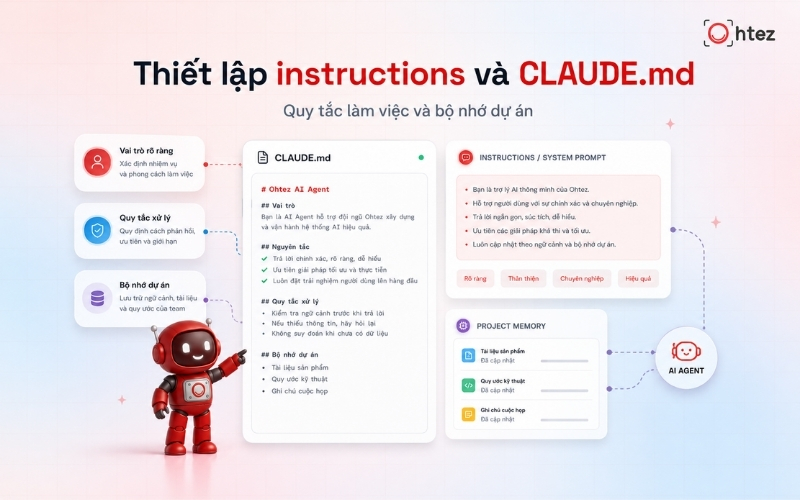
CLAUDE.md helps store coding standards, workflows, and information that needs to be reinforced throughout a project
Step 4: Create and configure the CLAUDE.md file
CLAUDE.md is an important component when learning how to create an AI Agent on Claude with Claude Code. It stores persistent instructions that Claude reads to understand project rules, structure, and the desired way of working.
According to the Claude Code documentation, CLAUDE.md can store coding standards, workflows, project architecture, and information that users frequently need to repeat. Claude Code also includes an auto-memory mechanism that can retain certain lessons or patterns across working sessions.
In CLAUDE.md, prioritize concise information such as the Agent’s goals, file-handling rules, output format, and mandatory limitations. When using Claude Code for long-term projects, this file helps the Claude Agent maintain a more consistent way of working across sessions.

Create, configure the CLAUDE.md file and add reference data
Step 5: Add reference data
An Agent can only produce good results when it receives the right context. Therefore, in how to create an AI Agent on Claude, reference data should be organized by function rather than placed together in one location. For example, a content Agent may use brand guidelines, customer personas, keyword sets, sample articles, and an SEO checklist. A coding Agent may instead need architecture documentation, conventions, dependencies, and deployment instructions.
More data is not always better. Excess context can make it harder for the Agent to identify what matters. When implementing how to create an AI Agent on Claude Code, keep documents up to date, remove duplicates, and clearly indicate which sources have higher priority. This organization helps the Claude Agent make more consistent decisions and makes its work easier to review.
Step 6: Connect the required tools
An Agent is truly useful only when it can take action. Claude Code already includes tools for reading and editing files and running commands; it can also connect to additional services and data sources through MCP. When implementing how to create an AI Agent on Claude, connect only the tools that directly support the workflow. For example, a project-management Agent may need access to a task system, while a data-analysis Agent may need a database or API.
Each tool should come with a clearly defined permission scope. Claude Code supports permission settings that determine which actions can run automatically and which require user approval. This is an important step when extending how to create an AI Agent on Claude Code into a real operating environment.
Step 7: Run and test the Agent
Do not move the Agent into a live workflow immediately after configuration. In how to create an AI Agent on Claude, the testing phase should cover scenarios ranging from simple to unusual in order to evaluate how well the Agent understands tasks and uses tools. You can start with a small task, such as asking the Claude Agent to read three documents and create a report from a template. Then check whether it uses the correct sources, follows the instructions, and stops at the right point.

How to create an AI Agent on Claude should include testing across multiple scenarios before the Agent is used in a live workflow
Next, test cases involving missing data, conflicting requests, or unavailable tools. A good Agent should report an error or request intervention rather than make assumptions. Thorough testing makes how to create an AI Agent on Claude Code safer before you increase the level of automation.
Step 8: Optimize the Agent after testing
After each test, record the errors and their causes instead of only correcting the final output. This is how you improve how to create an AI Agent on Claude using real operational data. If the Agent repeatedly misunderstands the same rule, add or rewrite the relevant instructions in CLAUDE.md. If it uses the wrong tool, adjust the permissions or describe the usage conditions more clearly. Claude Code documentation also recommends putting frequently repeated guidance into CLAUDE.md.
In addition to accuracy, track processing time, the number of times human intervention is needed, and the task completion rate. Claude Agent optimization should be continuous, because effective how to create an AI Agent on Claude Code does not end with installation; it also depends on how the Agent is operated over time.
How to use Claude Code to operate an Agent
After completing how to create an AI Agent on Claude, the next step is maintaining a consistent way of assigning work and controlling the Agent during use. Claude Code can handle many kinds of tasks, but its effectiveness depends on how clearly goals and context are provided and how much autonomy is appropriate. This is also an important factor when applying how to create an AI Agent on Claude in real workflows.
Assign tasks with clear prompts
When using Claude Code, assign each task with a specific goal, input data, limitations, and output standards. Instead of giving a vague request, clearly describe what the Agent should and should not do. CLAUDE.md is used for long-term instructions, while the prompt focuses on the task for the current working session. This is a key foundation in how to create an AI Agent on Claude so the Agent understands the request correctly.
Manage files and project context
For large projects, effective how to create an AI Agent on Claude should include proper context management. Organize folders clearly, use easy-to-understand file names, and provide only documents relevant to the task. CLAUDE.md should store the rules and information that need to remain consistent throughout the project.

Clear file and project-context management helps a Claude Agent identify the right documents to use
Monitor how the Agent executes tasks
Do not give a Claude Agent full authority from the beginning. The Agent can handle low-risk actions on its own, but actions such as deleting data, changing configurations, or deploying to a live system should require approval. Claude Code provides permission controls to manage this level of autonomy.
Review and adjust the output
The Agent’s output should still be reviewed before it is used for important tasks. If the same errors keep appearing, determine whether the cause lies in the prompt, context, CLAUDE.md, or permissions, and adjust that source instead of manually fixing each output. This helps the Claude Agent operate more reliably over time and further improves how to create an AI Agent on Claude.
>> See also: Top 10+ most powerful AI Agents for better productivity in 2026
Common mistakes when creating a Claude Agent
Many problems in how to create an AI Agent on Claude do not come from the model’s capabilities, but from how the workflow is designed. Four common mistakes deserve particular attention:
- Prompts and goals are too vague: The Agent does not know the completion criteria, may expand the task beyond its intended scope, and can produce results that differ from the original expectation.
- Access permissions are too broad: A Claude Agent may gain access to unnecessary files or tools, increasing risk when a task or its input data has problems.
- The Agent gets stuck in a task loop: Without clear stopping conditions, the Agent may keep editing, checking, or retrying without creating additional value.
- Output data is not reviewed: Using AI-generated results directly for important decisions can allow small errors to become larger problems.

Vague prompts, overly broad permissions, and missing stopping conditions are common mistakes when creating a Claude Agent
Tips for designing an effective AI Agent on Claude
Effective how to create an AI Agent on Claude is not about making the Agent automate everything. It is about identifying the right tasks to delegate to AI and deciding which controls should remain with people.
- Divide tasks by level of autonomy: Let the Agent handle repetitive, low-risk work first; important decisions should retain a confirmation step from the person responsible.
- Set human control points: Require approval before actions such as deleting data, publishing content, sending information, or changing a live system.
- Measure Agent performance with specific KPIs: Track task completion rate, processing time, the number of revisions, and the level of human intervention.
- Optimize the Agent using real data: Record errors, update instructions, and improve the workflow instead of continually making prompts longer.
With this approach, how to create an AI Agent on Claude Code can focus on real operational performance, while the Claude Agent becomes a controlled support tool rather than an automated system that is difficult to evaluate.

Effective how to create an AI Agent on Claude comes from choosing the right tasks for AI and deciding how much control should remain with people
In summary, effective how to create an AI Agent on Claude starts with a clear goal, the right context, tools, permissions, and continuous testing so the Agent becomes increasingly aligned with real work. If your business needs an AI Agent designed specifically around its processes, data, and operating goals, Ohtez provides custom AI Agent design services for each business—from defining the problem and building the workflow to integrating tools and optimizing operations. Instead of using one generic Agent for every need, your business can have an AI system built around the way it actually works and the outcomes it wants to achieve.